Showing posts with label Feathers. Show all posts
Friday, September 13, 2013
Hello Happiness
Hi Everyone,
I hope you are enjoying your week. I have a layout up on the Bella Blvd blog today that I would like to share with you using this sketch that was given to us.
I have loved being a part of the Bella Blvd team this year, it is hard to believe this is going to be my last assignment for the term. I wanted to end the year with a sweet and cheerful layout about friendship. The Snapshots collection worked beautifully with the sketch that was given to us. I stuck with the three main vertical columns in the sketch but incorporated bigger boxes so that I could use 4x6 photos. I also used the daily details cards, I love the way they complete the layout.
Hello Happiness Layout
Supply List:
Snapshots: Borders Snapshots, Daily Details Snapshots, My Point Of View, Rise & Shine
Cardstock Stickers: Alpha + Bits Snapshots, Captions Snapshots, Arrows Gulf
Die-Cut Shapes: Paper Pieces Snapshots
Crochet Heart: Pickle Juice
Feathers: Punch
Button Market: Pink Flowers, Stars
Thursday, August 29, 2013
Live Laugh & Let it Be
Hi Friends,
Are you ready for a Pinterest inspired post? Some of the girls at Bella Blvd were recently given this image (found on Pinterest) and asked to create a layout or a card with it. I took inspiration from all the colors and the gold circular dots.
Using this image here is what I came up with:
Live Laugh and Let it Be
I used my Silhouette Cameo to cut feathers out of vellum paper and embellished them with enamel
dots and gold confetti pieces before layering them with Bella Blvd Saltwater and Oreo-Black feathers. I love the look combined with the Snapshots collection. It is so playful and fun just like the teen girls in my photo.
Supplies:
Snapshots: Hurry Up!, Borders Snapshots, Daily Details Snapshots
Trick Or Treat: Leaf Storm
Cardstock Stickers: Alpha + Bits Trick Or Treat, Captions Trick Or Treat, Captions Snapshots
Feathers: Oreo-Black, Saltwater
Crochet Hearts: Saltwater
Are you ready for a Pinterest inspired post? Some of the girls at Bella Blvd were recently given this image (found on Pinterest) and asked to create a layout or a card with it. I took inspiration from all the colors and the gold circular dots.
Using this image here is what I came up with:
Live Laugh and Let it Be
I used my Silhouette Cameo to cut feathers out of vellum paper and embellished them with enamel
dots and gold confetti pieces before layering them with Bella Blvd Saltwater and Oreo-Black feathers. I love the look combined with the Snapshots collection. It is so playful and fun just like the teen girls in my photo.
Supplies:
Snapshots: Hurry Up!, Borders Snapshots, Daily Details Snapshots
Trick Or Treat: Leaf Storm
Cardstock Stickers: Alpha + Bits Trick Or Treat, Captions Trick Or Treat, Captions Snapshots
Feathers: Oreo-Black, Saltwater
Crochet Hearts: Saltwater
Monday, August 12, 2013
Monday Morning Challenge: Focus on the square
Hi there! I hope your Monday is off to a great start. I just dropped my son off for his first day of school. I am excited for him and a little sad that this will be his last year in elementary school (6th grade). It sure goes fast.
I have a fun layout to share with you today. I am taking part in the Monday Morning challenge over on the Bella Blvd blog today. Our challenge was to focus on squares, whether it be square elements, square photos, or square embellishments or a combination of them all.
Here is what I made for the challenge:
Hello Beach Layout
The new Snapshots collection by Bella Blvd was perfect for my recent photos that I took of the kids at Santa Cruz beach. When I first started this assignment, I laid out several small Instagram photos spread all over my page. This layout took on several changes and I ultimately decided to go for a cleaner look with 1 large focal point photo and a two smaller Instagram photos. For a fun look I added text to my photos before printing them and added a cardstock polaroid die-cut from the Snapshots collection to my large photo.
Supplies:
Snapshots: Daily Details, Pajama Day, Free Time, Hurry Up, Rise & Shine, Tabs, Paper Pieces; Daily Chevies: Gulf Arrows, Pickle Juice Arrows; Feathers: Bell Pepper, Ice; Button Market: Fruit Punch, Masculine Mix
I have a fun layout to share with you today. I am taking part in the Monday Morning challenge over on the Bella Blvd blog today. Our challenge was to focus on squares, whether it be square elements, square photos, or square embellishments or a combination of them all.
Here is what I made for the challenge:
Hello Beach Layout
The new Snapshots collection by Bella Blvd was perfect for my recent photos that I took of the kids at Santa Cruz beach. When I first started this assignment, I laid out several small Instagram photos spread all over my page. This layout took on several changes and I ultimately decided to go for a cleaner look with 1 large focal point photo and a two smaller Instagram photos. For a fun look I added text to my photos before printing them and added a cardstock polaroid die-cut from the Snapshots collection to my large photo.
Supplies:
Snapshots: Daily Details, Pajama Day, Free Time, Hurry Up, Rise & Shine, Tabs, Paper Pieces; Daily Chevies: Gulf Arrows, Pickle Juice Arrows; Feathers: Bell Pepper, Ice; Button Market: Fruit Punch, Masculine Mix
Wednesday, May 29, 2013
So Many Of My Smiles Begin With You....
Hi Everyone,
Thanks for stopping by today. I haven't been on top of blogging lately. We have had lots going on. We just got back from camping and my daughter graduates from junior high tomorrow. Can't believe I am going to be the mother of a high schooler soon. Ack!! Where does the time go?
I have a new layout up on the Bella Blvd. Blog today, and I would love to share it with you. So, here we go....
So Many Of My Smiles Begin With You
This picture always make me smile. My good friend always brings her daughter with her when she comes to visit. Even though she is a few years younger than my daughter, they always enjoy each others' company. I kept the embellishments simple on this layout so that the main focus could be on the photo. To make the washi flower I pleated gray chevron washi tape around a die cut circle and topped it off with a wood button. I love the look.
supplies:
Sand and Surf: Flying HighEngaged At Last: Bachelorette Extras
Cardstock stickers: Just Write Journaling stickers, Alpha + Bits
Feathers: Orange, Gulf
Designer Tape: Gray Chevron
Button: Button Market Feminine Mix
Thanks for stopping by!
Tuesday, May 14, 2013
Two Hearts One Love
It's wedding week on the Bella Blvd blog. As we make the countdown to Stephanie's wedding the design team is sharing layouts of our weddings and leaving wedding advice for Stephanie and Steven. To see the design team's work visit the Bella Blvd Blog
Two Hearts One Love
The new Bella feathers are perfect for accenting wedding pages! They add such a unique look.
On this layout I used the pony, oreo-black and pickle juice feathers to accent my photos.
I love the way they look along with the contrast of the black and white photos.
Two Hearts One Love
The new Bella feathers are perfect for accenting wedding pages! They add such a unique look.
On this layout I used the pony, oreo-black and pickle juice feathers to accent my photos.
I love the way they look along with the contrast of the black and white photos.
Love and Marriage: Vows, Cute Cuts, Esther Fleming Floral
Cardstock Stickers: Alpha + Bits
Flags: Love and Marriage, Engaged At Last: He Proposed, Bachelor Party
Chipboard: Sienna Alpha - Pickle Juice, Sienna Alpha -Pony
High Five Alphas: Brown-Cream High FivesDesigner Tape: Gray Chevron, Pony Dot
Feathers: Pony, Pickle Juice, Oreo-Black
Button Market: Checkers
Cardstock Stickers: Alpha + Bits
Flags: Love and Marriage, Engaged At Last: He Proposed, Bachelor Party
Chipboard: Sienna Alpha - Pickle Juice, Sienna Alpha -Pony
High Five Alphas: Brown-Cream High FivesDesigner Tape: Gray Chevron, Pony Dot
Feathers: Pony, Pickle Juice, Oreo-Black
Button Market: Checkers
Wednesday, May 1, 2013
So Many of my smiles begin with you
Hi Everyone,
Good morning, I have a fun tutorial showcased on the Bella Blvd. blog today and I would like to share it with you.
So Many of My Smiles
I had these bright cheerful photos that I took of my daughter at a park several years ago and I wanted to create a
colorful background to match. I love Bella's new designer tapes, the palette is so happy & bright and looks great paired with
the new feathers.
Step 1: To create the clouds for this page I first trimmed several pieces of white cardstock just a little
bit larger than the punch that I intended on using.
Step 2: I layered strips of Bella Blvd designer tapes on my cut pieces.
Step 3: Then I punched out the clouds and layered them on my page. I even save one of the cloud negatives and adhered
it to my page. These make such cute embellishments.
I also created a fun colorful title out of designer tapes by first - cutting my title using my Silhouette
Cameo, and then layering strips of designer tapes on strips of paper and adhering behind the title.
supplies:
Sophisticates: Freestyle Banana
Designer Tapes: Polka Dot Combo, Chevron Combo, Gray Dot, Hot Pink Dot, Yellow Chevron
Feathers: Gulf, Ice
Button Market: Stars, Orange Stars, Masculine Mix
Monday, April 15, 2013
You Make Me Happy....
Hi Friends,
I have a case of the Monday's today. It's Tax day (just stood in line to get them mailed off) and my allergies are in full bloom. I have a sore throat and a case of the sniffles so I can use some sunshine today and thought that you could too. I have a bright happy layout to share with you that I created recently using a new Hero Arts stamp set.
You Make Me Happy
I found this title in the silhouette store and couldn't wait to play with it. I stamped a border along the top and bottom of my layout using Hero Arts: So kind stamp set that they recently sent me.
For a quick and easy embellishment I handcut these cute little feathers. I am really loving this trend.
supplies:
Hero Arts: so kind stamp
ink: soft granite, tide pool, orange soda, butter bar
pattern papers: SEI Vanilla Sunshine
Well, that is it for now. Hope you have a productive day!
I have a case of the Monday's today. It's Tax day (just stood in line to get them mailed off) and my allergies are in full bloom. I have a sore throat and a case of the sniffles so I can use some sunshine today and thought that you could too. I have a bright happy layout to share with you that I created recently using a new Hero Arts stamp set.
You Make Me Happy
I found this title in the silhouette store and couldn't wait to play with it. I stamped a border along the top and bottom of my layout using Hero Arts: So kind stamp set that they recently sent me.
For a quick and easy embellishment I handcut these cute little feathers. I am really loving this trend.
supplies:
Hero Arts: so kind stamp
ink: soft granite, tide pool, orange soda, butter bar
pattern papers: SEI Vanilla Sunshine
Well, that is it for now. Hope you have a productive day!
Tuesday, March 12, 2013
I Love You 7 Days A Week...
Hi everyone!
You may have noticed that my blog has a new look. I have been wanting a fresh new look for awhile and I'm so excited, to finally see it completed. Thank you to the fabulous Kristen Tweedale for redesigning my blog for me. If you or someone you know is in the market for a new blog design, you should contact her. She is awesome!
....in other news, I'm up on the Bella Blvd. Blog today. A few of us Design team members were asked to create a layout based on this inspiration image..
March Inspiration image
This is what I came up with based on the sketch.
I Love You 7 Days A Week


This was such a fun inspiration image this month. I can honestly say that there were so many ideas that I took from this image.
The polka dot background inspired me to use Bella's Gray Dot Designer tape as a border. The numbers in the photo inspired
me to use Bella's fun number border from the Love and Marriage collection. The white frames in the photo also inspired me
to use this chipboard insert that I saved from the packaging of the Chipboard: Bachelor/ette Chipboard Icons. And the large
buttons in the photo inspired me to add a couple of blues buttons from Bella's Button Market. I love the finished look of it all
put together.

supplies:
Engaged At Last: Bachelor Party, Bachelorette party, He Proposed, Bachelorette Extras
Designer tape: Gray Dot
Love And Marriage Collection: Borders
Cardstock Stickers: Just Write Journaling Stickers, The Wedding Party Miniatures, High Five Alphabets: Gulf
Chipboard: Bachelor/ette Chipboard Icons, Sienna Alpha-Frosting
Feathers: Frosting, White
Button Market: Blues
You may have noticed that my blog has a new look. I have been wanting a fresh new look for awhile and I'm so excited, to finally see it completed. Thank you to the fabulous Kristen Tweedale for redesigning my blog for me. If you or someone you know is in the market for a new blog design, you should contact her. She is awesome!
....in other news, I'm up on the Bella Blvd. Blog today. A few of us Design team members were asked to create a layout based on this inspiration image..
March Inspiration image
This is what I came up with based on the sketch.
I Love You 7 Days A Week


This was such a fun inspiration image this month. I can honestly say that there were so many ideas that I took from this image.
The polka dot background inspired me to use Bella's Gray Dot Designer tape as a border. The numbers in the photo inspired
me to use Bella's fun number border from the Love and Marriage collection. The white frames in the photo also inspired me
to use this chipboard insert that I saved from the packaging of the Chipboard: Bachelor/ette Chipboard Icons. And the large
buttons in the photo inspired me to add a couple of blues buttons from Bella's Button Market. I love the finished look of it all
put together.

supplies:
Engaged At Last: Bachelor Party, Bachelorette party, He Proposed, Bachelorette Extras
Designer tape: Gray Dot
Love And Marriage Collection: Borders
Cardstock Stickers: Just Write Journaling Stickers, The Wedding Party Miniatures, High Five Alphabets: Gulf
Chipboard: Bachelor/ette Chipboard Icons, Sienna Alpha-Frosting
Feathers: Frosting, White
Button Market: Blues
Thursday, February 28, 2013
Silhoutte Designer edition software tutorial and promotion
Hi everyone,
I hope that you are having a great day so far. I wanted to let you know about this fabulous promotion that is going on
currently on the Bella Blvd. blog.... and wait for it..... they are doing a giveaway too!
Silhouette March Promotion
From now until March 8th Silhouette will be offering a discounted price on the Silhouette Portrait when you use the above link to purchase and enter the code "Bella"
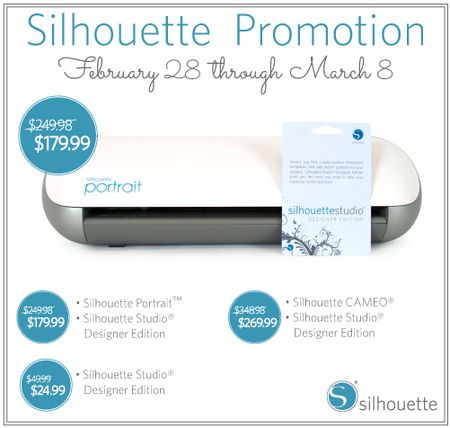
As part of this wonderful promotion, I was one of the design team members selected to try out the designer edition software and
create a project with it.
Fashionista layout:
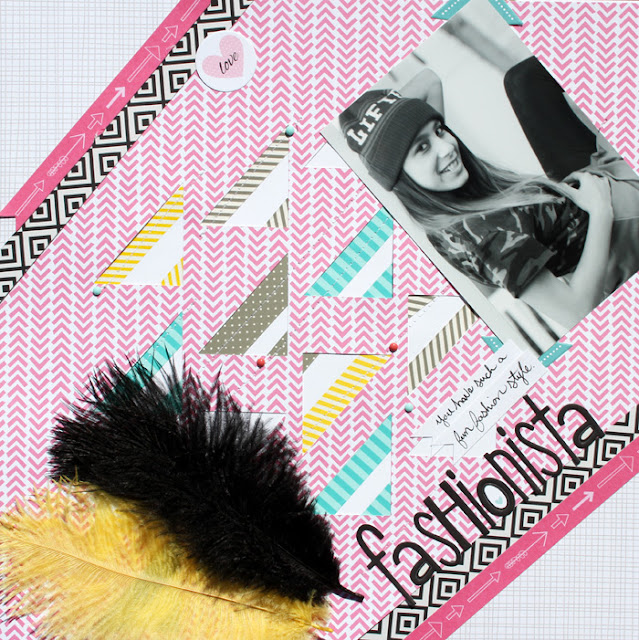
I wanted to create a layout that was as fun and fresh as my daughter's fashion sense. I started my layout by creating a
triangular file in Silhouette and using the designer edition software to modify it. After I cut my Freestyle Sophisticates paper
(Peep) I placed alternating strips of designer tape under my paper and then stitched on top. I added in pieces from the Engaged
At Last collection and finished off my layout with some fabulous Bella feathers.
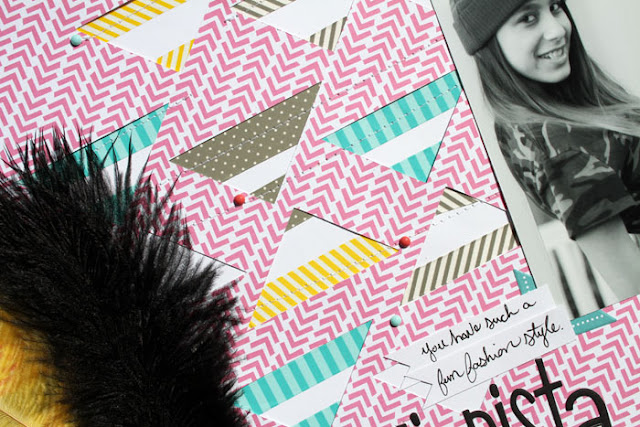
First I created a triangular shaped background using the polygon tool. I used the copy and paste feature to repeat the pattern.
After I was done creating my triangle background I used the group feature to group my background together.
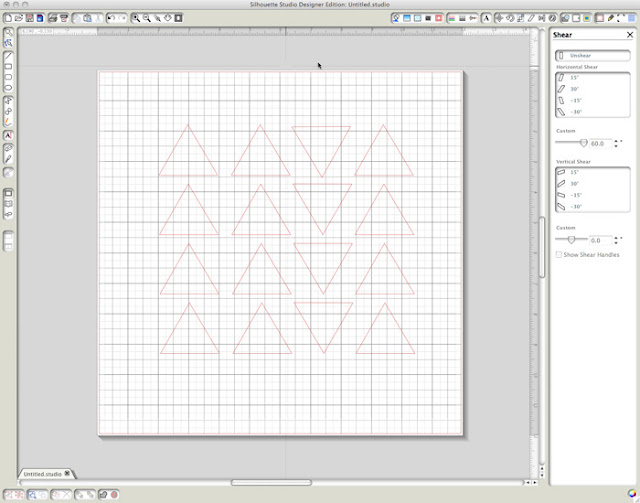
Next, I selected the Shear tool that comes with the designer edition software. I then selected the
Horizontal shear 30 degree angle from the box on the right side. This gave my triangles an elongated
look.

After getting the desired angle that I wanted I sent cut my file and then used it as a background for my layout.
supplies:
Engaged At Last Collection: Bachelor Extras
Cardstock Stickers: Alpha + Bits Bachelore/Ette
Sand & Surf Collection: Borders
Sophisticates: Freestyle Peep, Freestyle Scallop
Feathers: Bell Pepper, Oreo - Black
Designer Tape: Gray Chevron, Ice Stripe, Gray Dot, Combo
Dream Big by Gina Lideros
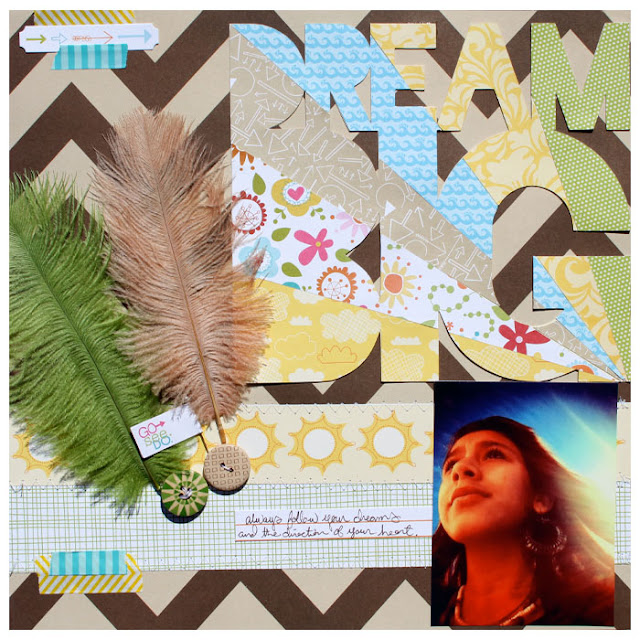
I had this self portrait of my daughter that she took using her camera phone. I just loved the way the sun rays reflected
on her in the background. I used that as my inspiration to create my title. I used the designer edition software for Silhouette
to modify a title "dream big" that I had purchased in the Silhouette online store.
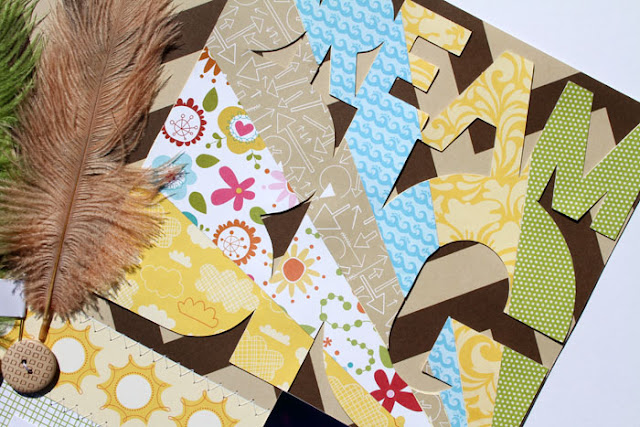
Bella Blvd's Sand & Surf collection was perfect for the theme of my layout. I kept the background of my layout simple so
that the focus could be on the title work and the photo. I finished off my layout by adding in a fun mix of Bella feathers,
buttons and designer tape.
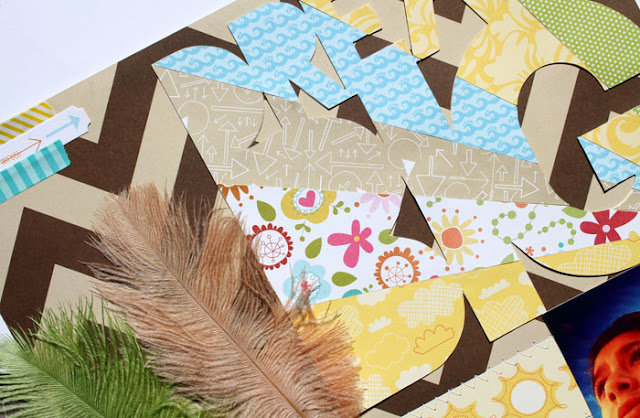
To get started, I opened up a file that I had purchased in the Silhouette online store (Dream big by KI Memories). I sized
my title to the dimensions that I wanted and then selected the advanced knife tool that comes with the designer edition software.
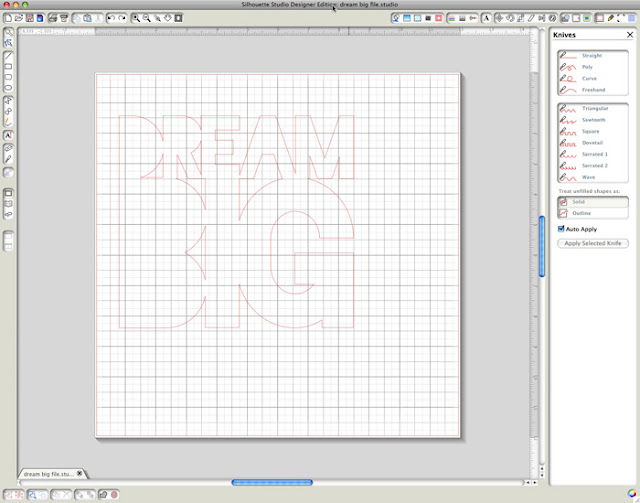
When selected the knife tool will open up a window on the right side. The advanced knife tool comes with 11 different
blades. This is a great feature of the designer edition. I selected the straight edge knife and positioned my blade in
the bottom right hand corner of my title. I then sliced into my title in an upwards angle.
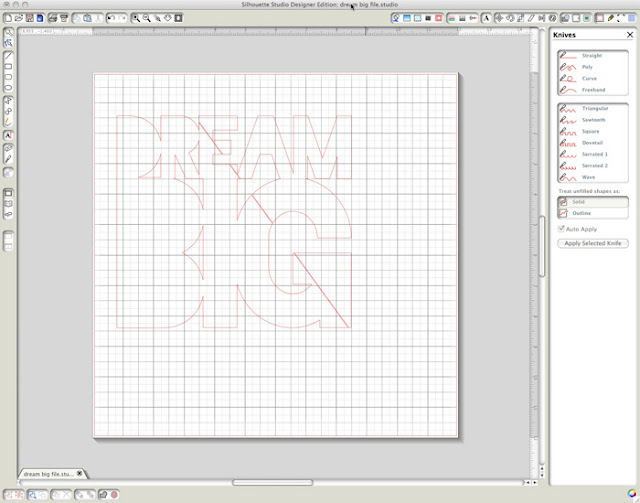
After I cut the first angle I continued making more cuts in an upward angle until it appeared to look like a sunburst.
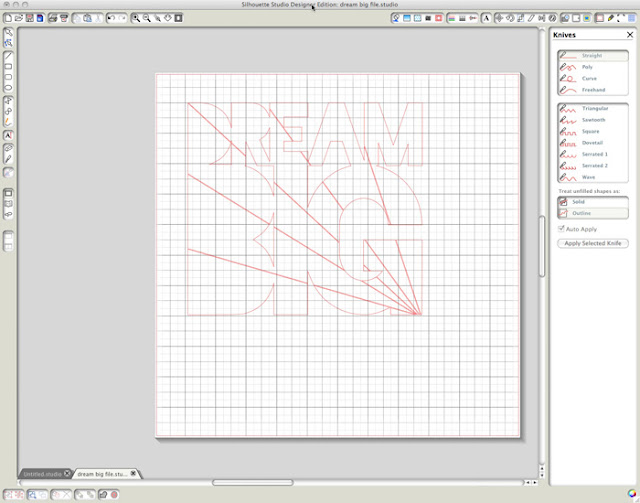
After I achieved the desired sunburst effect, I cut out my title out of different pieces of pattern paper from Bella's Sand & Surf collection. And then pieced them together on my layout.
supplies:
Sand & Surf Collection: Flying High, Paradise, Surf's Up, Borders, Under The Coconuts, Cute Cuts
Cardstock Stickers: Miniatures
Flags: Sand & Surf
Sophisticates: Freestyle Pickle Juice
Feathers: Pickle Juice, Pony
Designer Tape: Yellow Chevron, Ice Stripe
Button Market: Checkers, Bursts
Awesome stuff right? Wanna win a Silhouette Portrait? Then head on over to the Bella Blvd. Blog and leave a comment to be entered to win.
Good Luck!
I hope that you are having a great day so far. I wanted to let you know about this fabulous promotion that is going on
currently on the Bella Blvd. blog.... and wait for it..... they are doing a giveaway too!
Silhouette March Promotion
From now until March 8th Silhouette will be offering a discounted price on the Silhouette Portrait when you use the above link to purchase and enter the code "Bella"

As part of this wonderful promotion, I was one of the design team members selected to try out the designer edition software and
create a project with it.
Fashionista layout:

I wanted to create a layout that was as fun and fresh as my daughter's fashion sense. I started my layout by creating a
triangular file in Silhouette and using the designer edition software to modify it. After I cut my Freestyle Sophisticates paper
(Peep) I placed alternating strips of designer tape under my paper and then stitched on top. I added in pieces from the Engaged
At Last collection and finished off my layout with some fabulous Bella feathers.

First I created a triangular shaped background using the polygon tool. I used the copy and paste feature to repeat the pattern.
After I was done creating my triangle background I used the group feature to group my background together.

Next, I selected the Shear tool that comes with the designer edition software. I then selected the
Horizontal shear 30 degree angle from the box on the right side. This gave my triangles an elongated
look.

After getting the desired angle that I wanted I sent cut my file and then used it as a background for my layout.
supplies:
Engaged At Last Collection: Bachelor Extras
Cardstock Stickers: Alpha + Bits Bachelore/Ette
Sand & Surf Collection: Borders
Sophisticates: Freestyle Peep, Freestyle Scallop
Feathers: Bell Pepper, Oreo - Black
Designer Tape: Gray Chevron, Ice Stripe, Gray Dot, Combo
Dream Big by Gina Lideros

I had this self portrait of my daughter that she took using her camera phone. I just loved the way the sun rays reflected
on her in the background. I used that as my inspiration to create my title. I used the designer edition software for Silhouette
to modify a title "dream big" that I had purchased in the Silhouette online store.

Bella Blvd's Sand & Surf collection was perfect for the theme of my layout. I kept the background of my layout simple so
that the focus could be on the title work and the photo. I finished off my layout by adding in a fun mix of Bella feathers,
buttons and designer tape.

To get started, I opened up a file that I had purchased in the Silhouette online store (Dream big by KI Memories). I sized
my title to the dimensions that I wanted and then selected the advanced knife tool that comes with the designer edition software.

When selected the knife tool will open up a window on the right side. The advanced knife tool comes with 11 different
blades. This is a great feature of the designer edition. I selected the straight edge knife and positioned my blade in
the bottom right hand corner of my title. I then sliced into my title in an upwards angle.

After I cut the first angle I continued making more cuts in an upward angle until it appeared to look like a sunburst.

After I achieved the desired sunburst effect, I cut out my title out of different pieces of pattern paper from Bella's Sand & Surf collection. And then pieced them together on my layout.
supplies:
Sand & Surf Collection: Flying High, Paradise, Surf's Up, Borders, Under The Coconuts, Cute Cuts
Cardstock Stickers: Miniatures
Flags: Sand & Surf
Sophisticates: Freestyle Pickle Juice
Feathers: Pickle Juice, Pony
Designer Tape: Yellow Chevron, Ice Stripe
Button Market: Checkers, Bursts
Awesome stuff right? Wanna win a Silhouette Portrait? Then head on over to the Bella Blvd. Blog and leave a comment to be entered to win.
Good Luck!
Subscribe to:
Posts (Atom)